Item #HB-1ABP
IN STOCK
Remotely trigger up to FOUR devices.
The price depends on the chosen options

As low as $2999

Customize Wireless Trigger (4-Relay)

Your Customization

Wireless Trigger (4-Relay)

Summary
Final product price
description

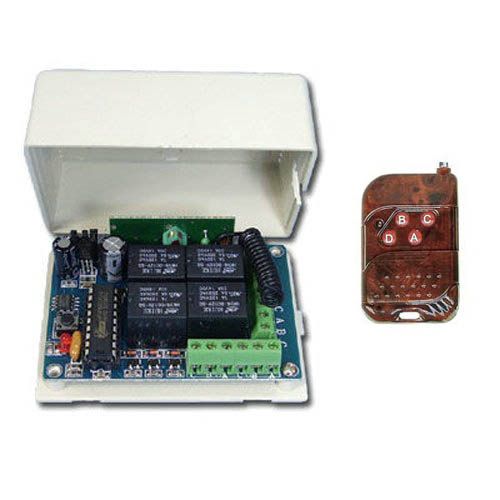
The module has four relays (7 amps max per) on screw down terminal blocks. PicoBoos, BooBoxs, lights, or any other device that can be triggered from a relay can now be activated wirelessly. Use with all FrightProps controllers and audio players or your own devices with trigger input. Package Includes:

  • 1 x Control Switch Board with four 7-amp relays on it
  • 1 x Remote Control with four buttons

Requires a 12VDC Power Supply. If you are powering from another device (such as a PicoBoo) then you will not require one.

Features:
• Working Voltage: DC12V
• Output voltage: Decided By the COM PIN INPUT
• Loop current limit:5A
• Idle Current: 5mA
• Working Frequency: 433Mhz
• Receiving Sensitivity: -104dBm
• Function option: Momentary/Toggle/Latched
 
 
Pin functions:
+V: Positive pole input
GND: Negative pole input
1 - Normal Closed of Relay 1   
2 - KC1 Common of Relay 1         
3 - KC1 Normal Open of Relay 1    
4 - KC3 Normal Closed of Relay 2
5 - KC3 Common of Relay 2              
6 - KC3 Normal Open of Relay 2     
7 - KC2 Normal Closed of Relay 3       
8 -  KC2 Common of Relay 3             
9 - KC2 Normal Open of Relay 3    
10 - KC4 Normal Closed of Relay 4     
11 - KC4 Common of Relay 4              
12 - KC4 Normal Open of Relay 4        

Please Note:

      • Actual antenna range will vary greatly depending on the installation and operating environment

Programming:

When you receive the product, it maybe set in one remote mode randomly, that is because each unit is tested at the factory.So, if you want to select the remote mode you like, please delete the existing data as described below:

Press the learning key on the Receiver Switch Module board 8 times, then wait for the LED indicator on the board flash 7 times, this will reset the mode of the remote.

How to set the remote mode:
 
 
1 - Momentary:
 
Press the learning key on the Receiver Switch Module board once. The on-board LED indicator will flash. Then press any key on the remote, the on-board LED indicator will flash 3 times to inform that momentary mode was set successfuly.
 
2 - Toggle:
 
Press the learning key on the Receiver Switch Module board 2 times. The on-board LED indicator will flash.Then press any key on the remote, the on-board LED indicator will flash 3 times to inform that toggle mode was set successfuly.
 
3 - Latched:
 
Press the learning key on the Receiver Switch Module board 3 times. The onboard LED indicator will flash.
Then press any remote key (i.e.: A) followed by a second key (i.e.: B), the on-board LED indicator will flash 3 times to inform that latched mode was set successfuly. The first pressed key will be ON and the second pressed key will be OFF.
 
 
4 - Relays 1 and 2 Momentary / Relays 3 and 4 Toggle:
 
Press the learning key on the Receiver Switch Module board 4 times. The onboard Led indicator will flash.
Then press any key on the remote, the on-board LED indicator will flash 3 times to inform that this mode was set successfuly.
 
 
5 - Relays 1 and 2 Momentary / Relays 3 and 4 Latched:
 
Press the learning key on the Receiver Switch Module board 5 times. The onboard Led indicator will flash.
Then press any key on the remote, the on-board LED indicator will flash 3 times to inform that this mode was set successfuly.
 
 
6 - Relays 1 and 2 Toggle / Relays 3 and 4 Latched
 
Press the learning key on the Receiver Switch Module board 6 times. The onboard Led indicator will flash.
Then press any key on the remote, the on-board LED indicator will flash 3 times to inform that this mode was set successfuly.
 
 
7 - Relays 1 and 2 Latched / Relays 3 and 4 Latched: 
 
Press the learning key on the Receiver Switch Module board 7 times. The onboard Led indicator will flash.
Then press any key on the remote, the on-board LED indicator will flash 3 times to inform that this mode was set successfuly.
 
Support

Customer Questions:

No Questions

Ask your question...

Asking about: Wireless Trigger (4-Relay)

Need Help?

For assistance with this product visit the Support & Training Center or Contact Us

Reviews

Review this product

There are currently no customer reviews for this product. If you have purchased this product please leave your own review. Your feedback helps others shop with confidence.Thank you!

Writing your review...

Review Details
You're reviewing: Wireless Trigger (4-Relay)
Your Rating *
Please select a star rating for all categories.
Submitting...

This form is protected by reCAPTCHA - the Google Privacy Policy and Terms of Service apply.